Server files
In a distributed client-server SCADA deployment with a central Server, the Server provides schematic files to all connected Clients automatically.
The server-files window can be opened with the Files command from the
Client’s More menu:
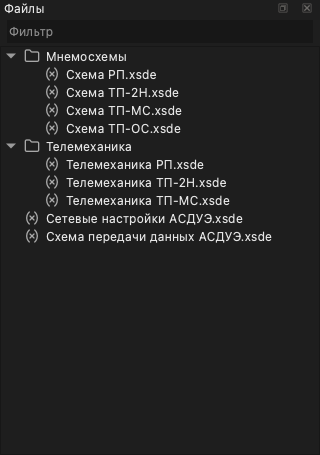
In the Files window, server-side schematic files can be organized into
multiple nested folders. Double-clicking a selected schematic file opens
it in the Client.
Uploading a display to the Server
- Open the
Fileswindow (More -> Files). - To make a folder, choose
Create -> Folderfrom the window’s context menu. - Select the folder the file belongs in and choose
Create -> Filefrom the context menu. Pick the display file (sdeorxsde) on your computer — it is sent to the Server.
Uploading needs the Configure right.
Where the Server keeps the files
A version 2.6 Server keeps the files in the folder of the
scada-filesystem process. On an installation made with scada-setup that
is
%ProgramData%\Telecontrol\SCADA Server\filestore\FileSystem
A version 2.5 Server kept them in
%ProgramData%\Telecontrol\SCADA Server\FileSystem; moving to 2.6 copies
them to the new folder. See
Server-side file system.
With this arrangement, changing a schematic file once on the Server is enough for the updated version to become available to all Clients connected to that Server.