User configuration
The users window is opened from the main menu with More -> Users, or from the
Users button at the foot of the section rail. It is available only to an
account holding the configure right.
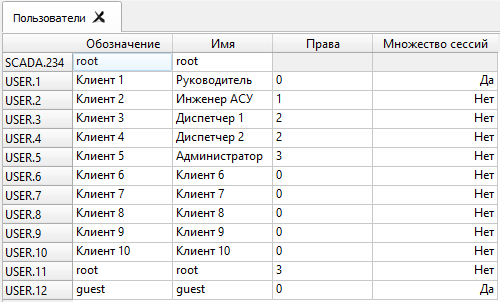
Double-clicking a user row starts editing its properties: the name, the description and the access rights.
To create a new user, choose Create -> User from the window’s context menu.
To delete a user, choose Delete from the user context menu.
To change a password, choose Set password from the user context menu. Your
own account requires the current password; someone else’s (an administrator
reset) does not. The server sets what a password must satisfy — see
Password policy.
Access rights
An account’s Rights property is two independent permissions:
- Control
- Issuing control and setpoint commands, manual value entry, editing limits.
- Configure
- Creating, changing and deleting objects, devices and accounts. In this version this right also includes everything the Control right gives — see the warning below.
Their combinations give the four familiar values. The table shows what an account can actually do:
| Rights | Control, manual input and limits | Configuration editing |
|---|---|---|
| 0 - Executive / viewer | No | No |
| 1 - SCADA engineer | Yes (see the warning) | Yes |
| 2 - Dispatcher | Yes | No |
| 3 - Administrator | Yes | Yes |
WARNING: in this version an account with the Configure right can also issue control and setpoint commands, enter values manually and change limits — even without the Control right. So rights 1 (SCADA engineer) are in effect the same as rights 3 (Administrator). Limits of a TIT object are, besides, part of its properties (the Limits group of the Properties window), and anyone allowed to edit the configuration can change them. Give the Configure right only to people who may operate the plant.
Roles
The server does not check requests against those two bits directly. It checks OPC UA roles, derived from them:
- every authenticated account gets the
Observerrole — reading values, history and events - the Control right adds
Operator— writing values and calling methods - the Configure right adds
Engineer,Supervisor,ConfigureAdminandSecurityAdmin— the full set, including adding and deleting nodes - an anonymous session gets the
Anonymousrole alone
An account may hold several roles at once, and their permissions combine. It is the roles, not the pair of bits, that the Users window and the workbench’s Access rights panel show; the panel derives from them what the account may view, control and configure.
Role membership can be inspected in the Roles window. It is read-only: changing a role’s membership is a privileged operation performed on the server.
Every action on accounts, passwords and role membership — successful or refused — is recorded in the audit log.
Translation status
This English page is a direct translation of the current Russian page.