Data-item configuration
- Control conditions
- Transformations and formulas
- Creating objects
- Deleting, copying, and moving objects
- Object properties
- Translation status
Only accounts holding the Configure right (see Users) can create, configure, delete, copy, or move data items and groups.
Each data item can use up to two data sources for hot standby. If the primary source loses validity, the system switches to the backup source automatically and switches back when the primary source recovers.
Each data item can also define one control channel. The control channel may even be the same exchange channel used as the source of the item’s data.
Control conditions
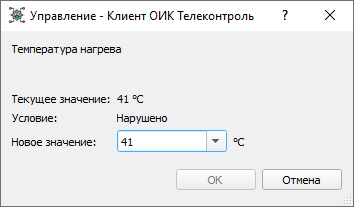
A control channel can include a logical control condition. When the condition is true, control is enabled:
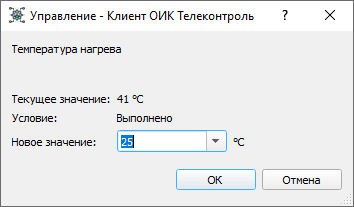
Otherwise, control is blocked:
Transformations and formulas
Incoming values can be:
- inverted for discrete objects
- transformed by a linear scale for measured values
- calculated using a formula
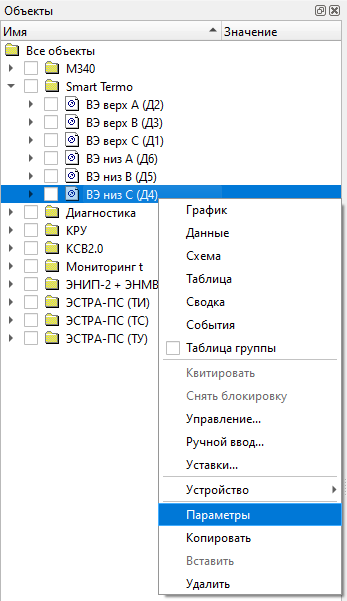
Object configuration is edited through either Properties for a single
object or Element Properties for an object group.
Creating objects
Objects can be created only inside an object group, and groups can be nested inside other groups.
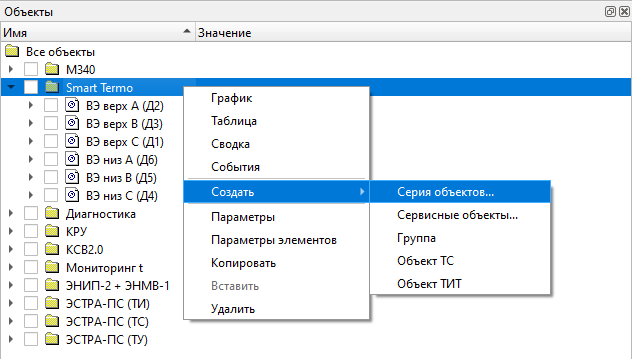
Single objects or object series are created through the Create menu:
Bulk create
The Multiple Create… command opens a wizard that creates a whole set of
objects from one pattern. It has three steps.
- Target and type
- "What to create" — data items, or transmission rules (the latter is offered
only when there is something for a rule to forward, that is when source objects
are already selected). For data items it also asks for the "Item type"
(discrete or analog), the "Device" that is their source, and a "Source path
template": the channel address on that device, with the same index tokens as
the name template (see below). Each object gets that address in its Channel
field, exactly as if the device and channel had been chosen in its properties
by hand. For an IEC 60870-5 device it is the information object address (for
example
1{nn}); for MODBUS it is a MODBUS channel address (for exampleHOLDREG:INT16:{n}). With no device selected, or an empty template, the objects are created without a source. - Pattern: naming and addressing
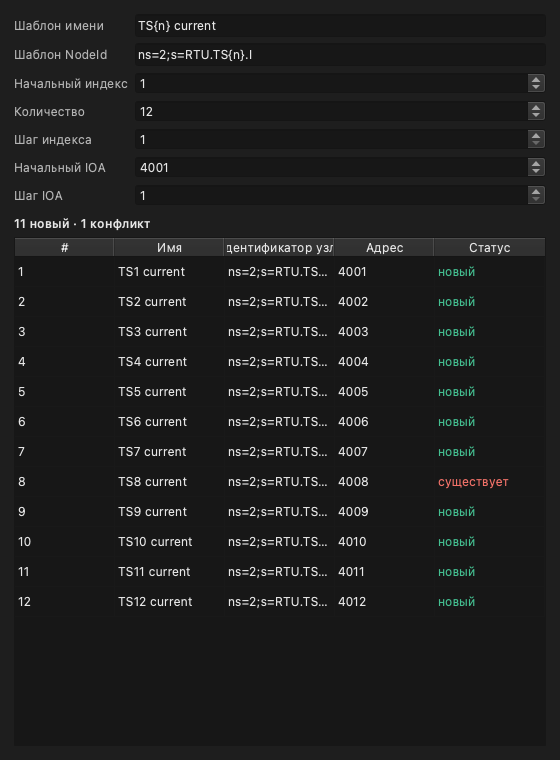
- The "Name template", "NodeId template" and "Source path template" take
index tokens:
{n}is the index in decimal,{nn}zero-padded to two digits,{hex}in hexadecimal. Any other text is copied verbatim, so "TS{n} current" at index 8 yields "TS8 current". The range comes from "Start index", "Count" and "Index step", and for transmission rules from "IOA start" and "IOA step" as well: a data item is not addressed on a link, so it has no IOA fields. The "NodeId template" sets the new objects' identifiers in OPC UA form. The Server accepts only numeric identifiers in the object type's namespace:ns=1;i=…for TS andns=2;i=…for TIT. The value the wizard proposes (ns=2;s=RTU.TS{n}.I) is a string identifier, and the Server will not create such objects. The simplest is to clear the field: the Server then assigns free numbers itself, as it does for an ordinary create. A live preview is built below — a row-number / Name / NodeId / IOA / Status grid. Status marks each row "new", "exists" (such a node is already there) or "address out of range", and a "N new, M conflict" summary sits under the grid. - Review and create
- States how many rows will be created out of the total: "Will create N of M". Conflicting rows are not counted, so running the wizard again over the same NodeId pattern completes the set rather than duplicating it. With an empty NodeId template existing objects are not recognised, and running it again creates them a second time.
Example: create five TIT objects “Feeder current 1” … “Feeder current 5” reading addresses 101–105 of an IEC 60870-5 device:
| Field | Value |
|---|---|
| What to create | Data items |
| Item type | Analog (TIT) |
| Device | the IEC 60870 device |
| Source path template | 1{nn} |
| Name template | Feeder current {n} |
| NodeId template | empty |
| Start index | 1 |
| Count | 5 |
| Index step | 1 |
For index 1 the template 1{nn} gives 101, for index 5 it gives 105.
The Pattern step, with its live preview:
Once created, the objects’ parameters can be edited in the usual way.
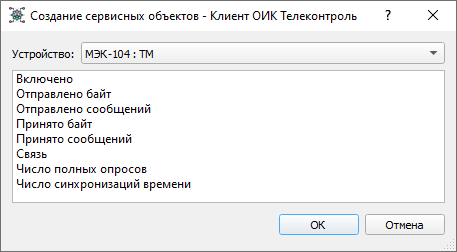
Service objects
Service objects can also be created for a specific device:
Deleting, copying, and moving objects
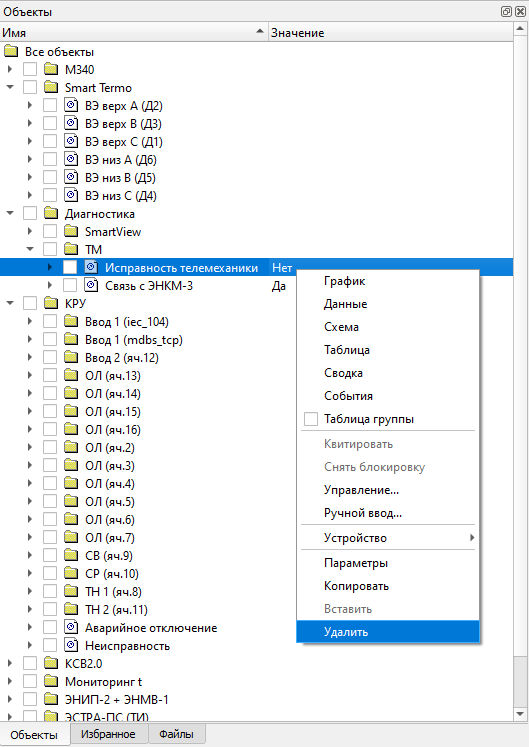
Objects and groups can be deleted through the Delete menu:
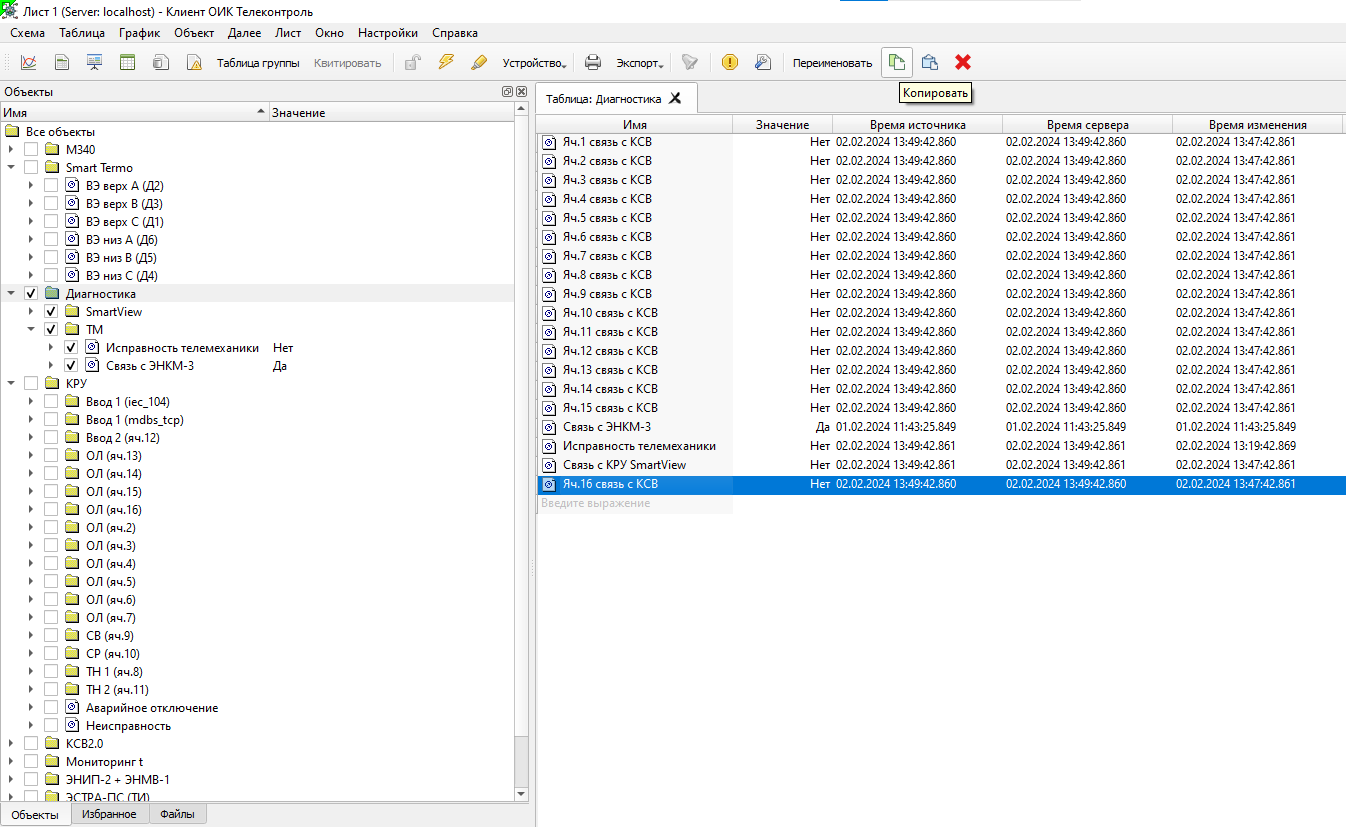
Copying is available through the Copy commands:
Objects and groups can also be dragged inside the object tree.
Object properties
Measured-object properties are configured in the object Properties window:
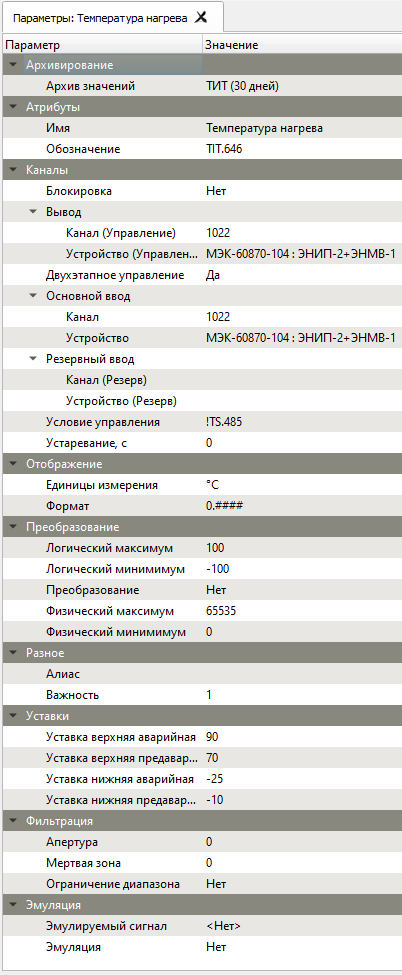
The main parameter groups are:
- Browse Name (Russian UI: «Обозначение»)
- In the Attributes group: the identifier the Server assigned to the object
when it was created, for example
TIT.646. Formulas and the Control condition refer to the object by it. - Value archive
- Selects the archive where object values are stored for later analysis
in graphs, summaries, and the event journal. The retention depth belongs to
the archive, not to the object. See
Archiving.
WARNING: in version 2.6 the Server refuses an archive assignment made
from the Client on an installation made with
scada-setupas separate processes; to assign archives to new objects, contact Telecontrol. Details are on the Archiving page. - Name
- The display name used everywhere in the system. Names do not have to be unique; full object identification is based on the full path through the parent groups.
- Control channel
- The channel address used for a control command in the protocol format required by the selected device.
- Control device
- Selects the device used as the control-data source for remote commands.
- Two-stage control
- Enables the IEC 60870 two-stage control workflow
SELECT/EXECUTE. If disabled, the command is executed in a single stage. Default: Yes. - Lock
- Yes — the object ignores values from the device and keeps the value set by
manual input (quality flag
B). Default: No. See Manual input and blocking. - Channel
- Defines either the information-object address in the selected protocol format or a calculated [formula](/scada/en/formulas/) when no device is selected.
- Device
- Selects the primary source device. If no device is selected, the channel field is interpreted as a formula.
- Backup channel
- Defines the information channel or service object for the backup data source.
- Backup device
- Selects the backup source device.
- Control condition
- A logical expression that enables or blocks control. It usually
references discrete-object aliases or their designations, such as
TS.1379(see Formulas). Do not start it with=. - Stale timeout, s
- If the value is not updated within this interval, it is marked as stale.
- Display parameters
- For discrete objects, selects the display format used in the UI.
The available formats can be managed from
More -> Formats. - Inversion
- Used only for discrete objects to invert the received state.
- Transformation
- For measured values, defines how incoming data is processed. Default:
None. WARNING: in this version the list may offer no choices,
and then linear scaling cannot be switched on from the Client — see
Fields with a list
of values.
- Linear
- Applies offset and scale transformation.
- None
- Disables transformation.
- Logical minimum and maximum
- Define the logical value range and the Y-axis range used by graphs.
- Physical minimum and maximum
- Define the physical value range used in linear scaling.
- Alias
- A unique system-wide alias used in formulas, logical expressions,
tables, graphs, and schematic bindings. Aliases may contain Cyrillic or
Latin letters and digits, but no spaces, and must be no longer than 50
characters. For a formula
to reach an alias, it must start with a letter or
_. - Severity (Russian UI: «Важность»)
- A number from 1 to 1000, default 10. The object's events carry it, and it colours and filters them in the event journal and the current-event panel.
- Event rows are coloured by severity: * 800 and above: red background ("Critical", alarm) * 600 to 799: yellow background ("Warning") * below 600: not highlighted
- An unacknowledged event is marked by a dot in the first column and by "— pending —" in the acknowledge-time column; the row colour comes from the severity alone. See Severity.
- Range limiting
- Clamps the value to the logical range.
- Aperture
- Filtering group, TIT only: the smallest change of value that is accepted; smaller changes are ignored. In the object's units; 0 (default) means no filtering.
- Deadband
- Filtering group, TIT only: values smaller in magnitude than this are forced to zero. In the object's units; 0 (default) means unused.
- Limits
- Limits group, TIT only: low alarm, low warning, high warning and high alarm limit. An empty value means the limit is not set. They can be changed here or with the Limits command — see Limit checks. Anyone holding the Configure right can change them in the properties.
- Display
- Controls how a measured value is formatted:
- Engineering units
- The unit suffix shown after the value.
- Format
- The number of decimal places.
- Simulation
- Simulation group. Yes — the object takes its values not from the device but from the simulation signal chosen in the Simulation signal field. Default: No. An object group has the same flag: when it is on for the group, every object in it that has a signal chosen is simulated.
- Simulation signal
- Simulation group: the signal that feeds the object in simulation. Without
the Simulation flag on (on the object or its group) this choice has no
effect.
Signals are created in the Simulated signals window (
More -> Simulated
signals
) withCreate -> Simulation signal. A signal has a Type — the waveform (default: random; the list may offer no choices, see Fields with a list of values) — Period, ms (60000), Phase, ms (0) and Update, ms (1000). See also Simulated signals.
Translation status
This English page is now a substantially fuller engineering reference. The Russian page still remains the fullest low-level source.