Equipment configuration
- Create devices
- Device properties
- MODBUS devices
- MODBUS register addressing
- IEC 60870-5 devices
- IEC 61850 devices
The equipment window can be opened from the main menu with
More -> Equipment.
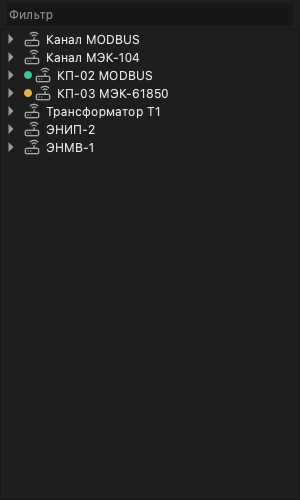
Create devices
Directions are created from the context menu of the Equipment window:
right-click an empty part of the window, with nothing selected, and choose
Create:
IEC 60870-104 Link— an IEC 60870-5-104 direction (Russian UI: «Канал IEC 60870-104»);IEC 60870-101 Link— an IEC 60870-5-101 direction;Modbus direction;IEC 61850 device.
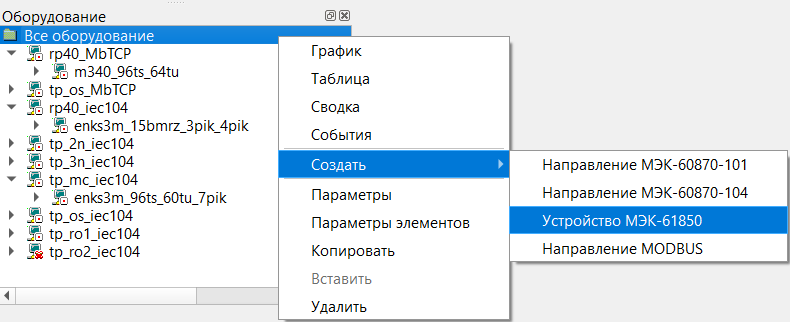
An IEC 60870-5 device is added from the direction’s context menu with
Create -> IEC 60870 device, a Modbus device with
Create -> Modbus device.
A new IEC 60870-5 direction is named “IEC 60870-104 Link” or “IEC 60870-101
Link”; rename it in its properties. A -104 direction is created as a TCP
client to localhost, port 2404, a -101 direction on serial port COM1.
Set its Transport to match your site.
A device or direction works only while its Disabled property is No. The
model default for that property is Yes, so check it after creating. The
Enable and Disable context-menu commands switch it as well.
Device properties
To edit an element’s parameters, open the element context menu and
choose Properties.
Fields with a list of values
WARNING: in this version the fields with a list of values — a direction’s
Protocol and Mode, a TIT object’s Conversion, a simulation signal’s Type —
may offer no choices. Such a field then cannot be changed from the Client,
and the default stated on this page applies. An IEC 60870-5 direction’s
protocol is set by the command that creates it (IEC 60870-104 Link or
IEC 60870-101 Link), so an empty list does not get in the way there. If
you need another value in such a field (for example the Modbus TCP protocol
or Modbus retransmission mode), contact Telecontrol (mail@telecontrol.ru).
Address map
Besides the tabs carrying its own parameters, a device has an Address map tab — the list of signals read from it, with the columns Signal, Type, IOA and NodeId. The tab is read-only: an address is set in the data item’s own parameters, in its Channel field (see Data items). The map answers the reverse question — which object is behind an address that arrived from the device — and it is the same map the frame decode uses in the device watch window.
Checking the setup
After creating a direction and a device, make sure data is flowing:
- Disabled is No on both the direction and the device.
- The indicator left of the device in the Equipment window shows the
channel as enabled, not “device not responding”. The
Metricscontext command shows the channel’s service data. - The Watch window shows
the exchange. For IEC 60870-5, once connected, a general interrogation
runs:
C_IC_NA_1with its activation confirmation, the data, and the activation termination. - The values of objects bound to the device arrive without the quality
flags
C(no communication),H(connection error) andK(configuration error) — see Quality flags. - For a controllable object, send a test command and check in Watch that the device confirmed it.
MODBUS devices
Supported MODBUS function codes are described in Protocols.
MODBUS direction parameters
- Protocol
- RTU, ASCII or TCP. Default: RTU. See the warning on list fields.
- Mode
- Polling — the SCADA polls the devices (default); retransmission — the SCADA answers another system's requests. See the warning on list fields.
- Transport
- The communication channel: a serial port or a TCP/UDP network, set in the Transport window opened by the button in the field.
- Request delay, ms
- An artificial delay between the response and the next request. This is useful for serial devices that switch slowly between transmit and receive modes. Default: 0.
- Disabled
- Yes — the direction does not run.
MODBUS device parameters
- Address
- The device (slave) address in MODBUS requests. Default: 1.
- Suspend duration, ms
- If several devices are polled cyclically and one device stops responding, polling of that device can be suspended for a while so the other devices can still be queried on time. Default: 30000.
- Transmission retry attempts
- The maximum number of repeated requests when the device does not respond; after that, communication loss is reported. Default: 3.
- Response timeout, ms
- The maximum wait for a device response, in milliseconds, before the request is retried. Default: 1000.
- Disabled
- Yes — the device is not polled.
MODBUS register addressing
Each MODBUS register is 16 bits wide and is treated as a single word.
Each word contains two bytes, Hi and Lo, stored in direct order:
[Hi][Lo].
Two MODBUS registers form a 32-bit double word. Four MODBUS registers form a 64-bit value.
Examples:
- single word:
0x10DE - double word:
0x10DE34A8
The protocol uses four logical register groups:
| Register number (dec) | Register address (hex) | Register type | Command | Access |
|---|---|---|---|---|
1-9999 |
0x0000-0x270F |
Coils | 0x01/0x05(0x0F) |
Read/write |
10001-19999 |
0x0000-0x270F |
Discrete Inputs | 0x02 |
Read |
30001-39999 |
0x0000-0x270F |
Input Registers | 0x04 |
Read |
40001-49999 |
0x0000-0x270F |
Holding Registers | 0x03/0x06(0x10) |
Read/write |
The decimal register number is not the same as the hexadecimal address carried in MODBUS frames. The difference between them is the group offset.
Depending on the register type, MODBUS values can be interpreted as:
BOOLINT8/UINT8INT16/UINT16INT32/UINT32FLOATDOUBLE
Full MODBUS channel-address format
The full format contains one required field and several optional ones:
[type_data[count]:]NUMBER[:bit[+bitcount]][;swapbytes]
Fields:
type_datais one ofBOOL,INT8,UINT8,INT16,UINT16,INT32,UINT32,FLOAT,DOUBLEcountexplicitly sets the number of registers to readNUMBERis the decimal register numberbitis the first bit to mask, numbered from 1 to 16bitcountreads several bits starting atbit;swapbytesswapsHiandLobytes inside a 16-bit word;swapwordsswaps the 16-bit words inside a 32-bit word
Typical examples include:
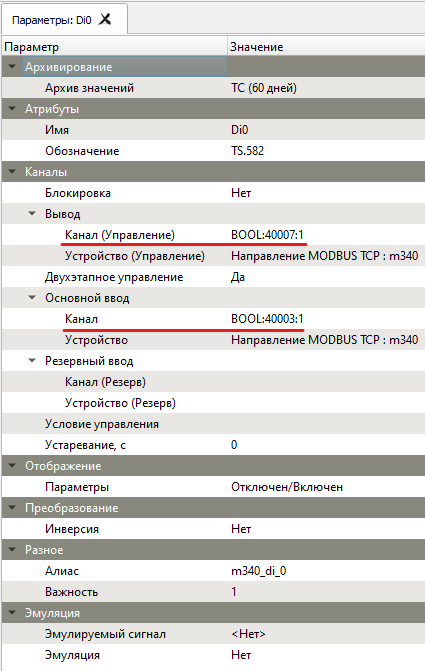
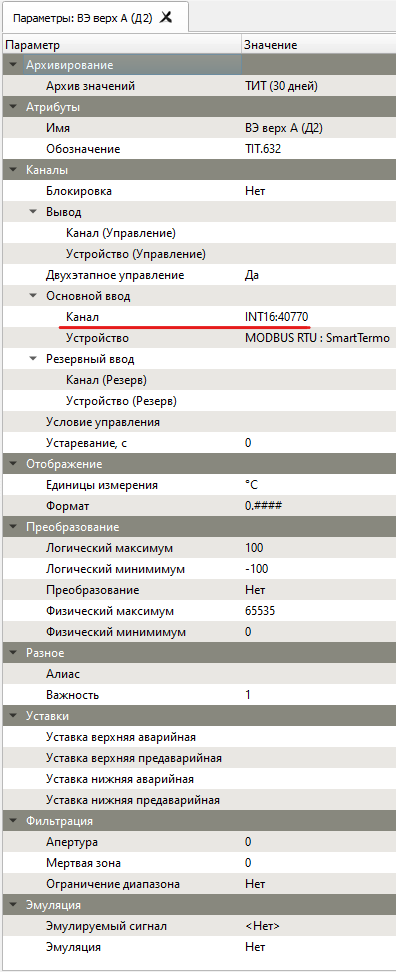
FLOAT:30001INT16:41105;swapbytesUINT32:41105;swapwordsUINT16:30001:1+7UINT16:30001:9+7BOOL:40003:51100013000140001HOLDREG:FLOAT:10001
Short MODBUS channel-address format
The short format uses the absolute decimal MODBUS register address instead of the logical register number:
TYPE_REGISTER:TYPE_DATA:ADDR
Fields:
TYPE_REGISTERis one ofCOIL,DISCINPUT,INPUTREG,HOLDREGTYPE_DATAis one of the supported data typesADDRis the absolute decimal register address
This format is used when the actual hexadecimal register address is
higher than 0x270F.
Examples:
HOLDREG:FLOAT:10001INPUTREG:FLOAT:10001HOLDREG:INT32:10001INPUTREG:UINT32:10001(read with function0x04)HOLDREG:DOUBLE:10001
The two parameter screenshots below show where these MODBUS channel definitions are entered for discrete and measured objects:
IEC 60870-5 devices
The supported IEC 60870-5 ASDU identifiers are described in the Protocols page.
IEC 60870-5 direction parameters
Defaults are given in brackets.
- Protocol
- IEC 60870-5-104 or IEC 60870-5-101, set by the command that created the
direction (
IEC 60870-104 LinkorIEC 60870-101 Link). - Mode
- Polling (default), retransmission or listening. In this version the direction's behaviour is decided mainly by Data collection and Transport: the SCADA polls the devices when data collection is on and answers another system's requests when it is off. Listening applies to IEC 60870-5-101 only. See the warning on list fields.
- Data collection
- Yes (default) — the SCADA is the controlling station: after connecting it sends the devices general interrogation and clock synchronisation commands. No — it sends neither and answers another system's requests; this is how retransmission is set up.
- Transport
- The communication channel. The button in the field opens the Transport window: Type (TCP Client, TCP Server, UDP Client, UDP Server, Serial Port), Host and Port for a network, or the serial-port settings. 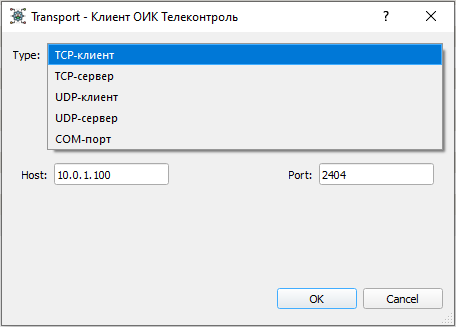
- Event archive
- Selects the archive used to store network traffic for later analysis and saving to a text log file.
- Anonymous mode
- No (default) — on connecting, the SCADA opens a session for every device configured under the direction and polls each at its own address. Yes — a configured device is brought into service only when its first frame arrives, and right after connecting the SCADA sends one general interrogation to the broadcast common address 0xFFFF. Frames from addresses with no configured device are dropped with the warning "Unknown device address".
- Send window (k)
- Maximum number of unacknowledged transmitted ASDUs (12).
- Receive window (w)
- Number of received ASDUs after which an acknowledgement is sent (8).
- Transmission retry attempts
- For IEC 60870-5-104: how many times an unacknowledged frame is retransmitted on t1 expiry before the connection is closed (0).
- Connection timeout (t0), s
- Time allowed to establish the connection (30).
- Send timeout (t1), s
- Time allowed for the acknowledgement of a sent ASDU (15). When it (and the retries) run out, the connection is closed and re-established.
- Receive timeout (t2), s
- Time before a receive acknowledgement is sent when no further data
arrives (10).
t2must be smaller thant1. - Idle timeout (t3), s
- Idle time after which a test frame is sent (20).
- Acknowledgement timeout, s
- Time allowed for the confirmation of a control or setpoint command and of clock synchronisation (5). An unconfirmed control command fails; an unconfirmed clock synchronisation drops the connection.
- Operation timeout, s
- Time within which a general or group interrogation must finish (20). If it does not, the connection is dropped and re-established. It does not apply to control commands.
- Device address size
- Size of the common ASDU address in bytes (2).
- Cause of transmission size
- Size of the cause-of-transmission field in bytes (2).
- Object address size
- Size of the information object address in bytes (3).
- CRC protection
- Yes — the SCADA expects two extra checksum bytes at the end of every received IEC 60870-5-104 frame. This is a non-standard extension; turn it on only when the equipment requires it (No).
- Disabled
- Yes — the direction does not run.
The default field sizes are those of IEC 60870-5-104 and are not changed when an IEC 60870-5-101 direction is created. For -101, set them from the device documentation; typical values:
| Field size, bytes | 104 | 101 |
|---|---|---|
| Information-object address | 3 | 2 |
| Device address (common ASDU address) | 2 | 1 |
| Cause of transmission | 2 | 1 |
IEC 60870-5 device parameters
Defaults are given in brackets.
- Address
- The device's common ASDU address (1).
- Switch address
- The link-layer address of the device for IEC 60870-5-101 (1).
- Event archive
- Selects the archive used to store traffic for one specific device.
- UTC time
- Timestamp format: Yes — UTC, No — local time (No).
- General interrogation on startup
- Whether
C_IC_NA_1is sent after the connection is established (Yes). - General interrogation period, s
- How often the general interrogation is repeated (0). 0 means no periodic interrogation; only the startup one runs, if enabled.
- Group 1...16 poll period, s
- Per-group interrogation periods (0 — the group is not interrogated).
- Clock synchronisation on startup
- Whether
C_CS_NA_1is sent after the connection is established (No). - Clock synchronisation period, s
- How often clock synchronisation is repeated (0 — no periodic synchronisation).
- Disabled
- Yes — the device is not polled.
Interrogation and clock synchronisation run only while the direction’s Data collection is on.
Retransmission to a dispatch centre
Example: a dispatch centre (DC) receives SCADA data over IEC 60870-5-104, with the SCADA as the controlled station — the TCP server the DC connects to.
- In the Equipment window, right-click an empty part of the window with
nothing selected and choose
Create -> IEC 60870-104 Link. - In the new direction’s properties set:
- Name — for example “DC”;
- Transport — in the Transport window: Type = TCP Server, Port = 2404 (or
the port agreed with the DC), Host =
0.0.0.0to accept connections on every network interface, or the IP address of the network card facing the DC. Withlocalhost, which a new direction gets, only this computer can connect; - Data collection = No — the SCADA will not send the DC interrogation or clock synchronisation commands;
- Mode — retransmission, if the list offers choices. For IEC 60870-5-104 an empty list (see the warning) does not get in the way;
- k, w, t1–t3 and the field sizes — as agreed with the DC;
- Disabled = No.
- Under the direction,
Create -> IEC 60870 device. Set its Address — the common ASDU address the DC uses for the SCADA — and Disabled = No. - Select the device and open the
Transmission Table. Add rules: each links a SCADA object (Source object) to an information object address in the DC (Receiver object address). The table is described in Transmission rules;Multiple Createmakes many rules at once (see Data items). - Open the port in the firewall of the computer running the Server’s IEC 104 process.
- Check: once the DC connects, the Watch window shows the exchange, and the DC’s general interrogation returns the object values.
Modbus retransmission needs Mode = retransmission on the Modbus direction; if that list is empty, contact Telecontrol.
IEC 61850 devices
A device is created with Create -> IEC 61850 device from the Equipment
window’s context menu (right-click an empty part of the window). Its
properties are Host — the device’s network address — and Port (default
102), plus Disabled = No. Under the device an IEC 61850 RCB (report control
block) can be created, with its Address set to the block’s reference in the
device model. The device model appears in the Model subtree.
Any model node exposes its bindable address through the Properties
command in the context menu.
Server objects can also be created by dragging IEC 61850 model objects into an object group. Dragging a full functional-constraint group creates all objects from that group. Dragging a model object onto an existing SCADA object updates the existing binding.