Summary
- Period
- Rows and empty cells
- Summary size
- Aggregation interval
- Aggregation function
- Printing and export
A summary is a table with one column per object and one row per time interval; each cell holds the object’s value over that interval, computed by the chosen aggregation function. A summary is built from the Server’s archive (see Reports and analysis).
For one object or multiple objects, the client can open a Summary
table:
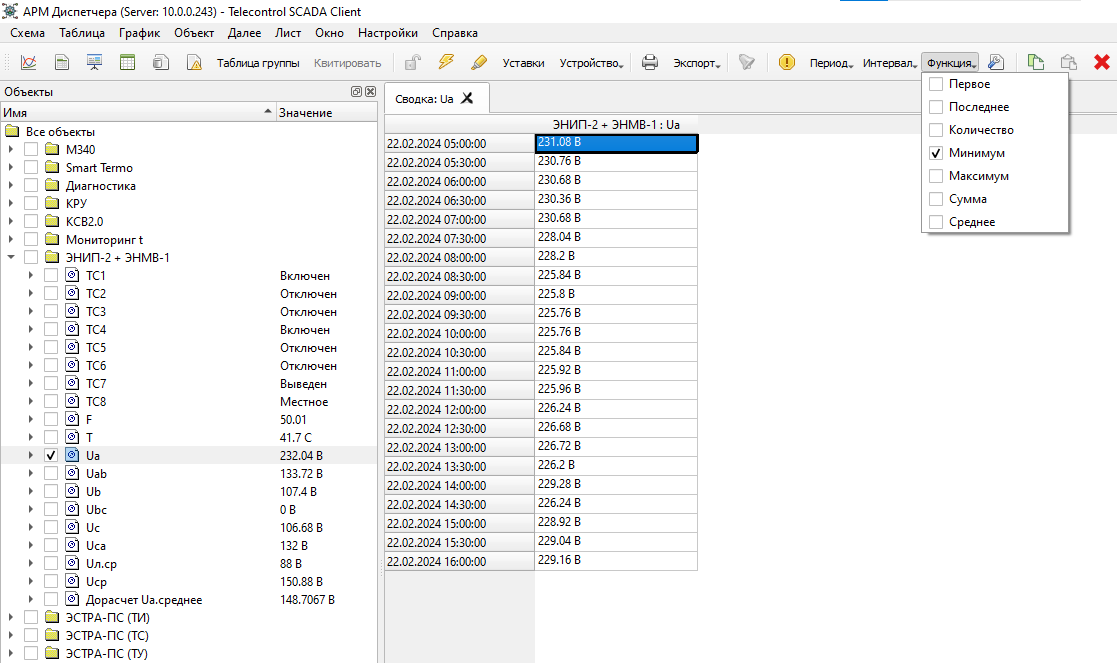
Columns can be added or removed through the object panel by toggling the selected objects.
When the
Graph or
Data command is launched
from the Summary context menu, the selected object and time interval
are reused.
Cells are shown in gray while historical data is still being requested from the Server, and take their normal colour as the data arrives.
Period
The period is set with the Period commands on the command bar: 15 min, Hour, Day, Week, Month and Custom… — see Choosing a period. A new summary starts with the period Day, a 1-hour interval and the Last function. The period, interval and function are saved with the window.
Rows and empty cells
Each row is labelled with the start of its interval, in the local time of the computer running the Client. With a 1-hour interval, the row “10:00” holds the values from 10:00 to 11:00.
An empty cell means that the archive holds no recorded change of the value in that interval. That is not necessarily missing data: if the value did not change during the whole interval, the archive holds nothing for it and the cell stays empty — for the Last function too. The value in force at the start of the interval is not carried over from the previous interval.
Summary size
A summary holds at most 10,000 rows and 1,000 columns.
WARNING: if the period contains more than 10,000 intervals, the summary silently ends at row 10,000. For example, Month with a 1-minute interval stops about 6.9 days after the start of the month. For a week or a month choose an interval of 5 minutes or longer; 1 hour or 1 day is usually enough for a report.
Aggregation interval
The row length is chosen with the commands 1-Minute, 5 min, 15 min, 30 min, 1-Hour, 12 hours and 1-Day. Intervals are aligned to local time: hourly intervals start on the hour, daily ones at midnight.
Aggregation function
The functions work on the changes recorded in the archive within the interval — on individual points, not on how long each value was in force. Values flagged as invalid are counted the same as valid ones.
- First
- The first recorded value in the interval.
- Last
- The last recorded value in the interval. This is the default.
- Count
- The number of recorded changes in the interval.
- Minimum
- The smallest recorded value.
- Maximum
- The largest recorded value. WARNING: because of a defect, when every value in the interval is negative it shows about 0 instead of the real maximum.
- Sum
- The plain sum of the recorded values. It is not energy and not a time integral: a value that stayed unchanged for a long time enters the sum once, while one that changed often enters it many times.
- Average
- The arithmetic mean of the recorded values, ignoring how long each value was in force. For measurements archived only on change it can differ noticeably from a time-weighted average.
Cell values are shown in the object’s display format and engineering units (Sum in the same units as the measurement itself).
Printing and export
A summary can be printed and exported to CSV. The printout and the file contain the table and the row labels, but not the period, the interval or the aggregation function — note them in the file name or on the printout.