Overview
Telecontrol SCADA is supervisory control and data acquisition software for collecting field data, presenting it to operators, issuing control commands, archiving telemetry, and displaying historical information.
The system uses a client-server architecture. The Server is a set of separate processes: protocol processes (MODBUS, IEC 60870-5-104, IEC 61850 and others), the archive, the configuration, the file store, and a proxy that Clients connect to. The processes are purchased separately and the license lists the ones purchased; a small site needs only one protocol process. See Server processes. Any number of Clients can connect over TCP/IP, and client sessions remain resilient while the Server stays online.
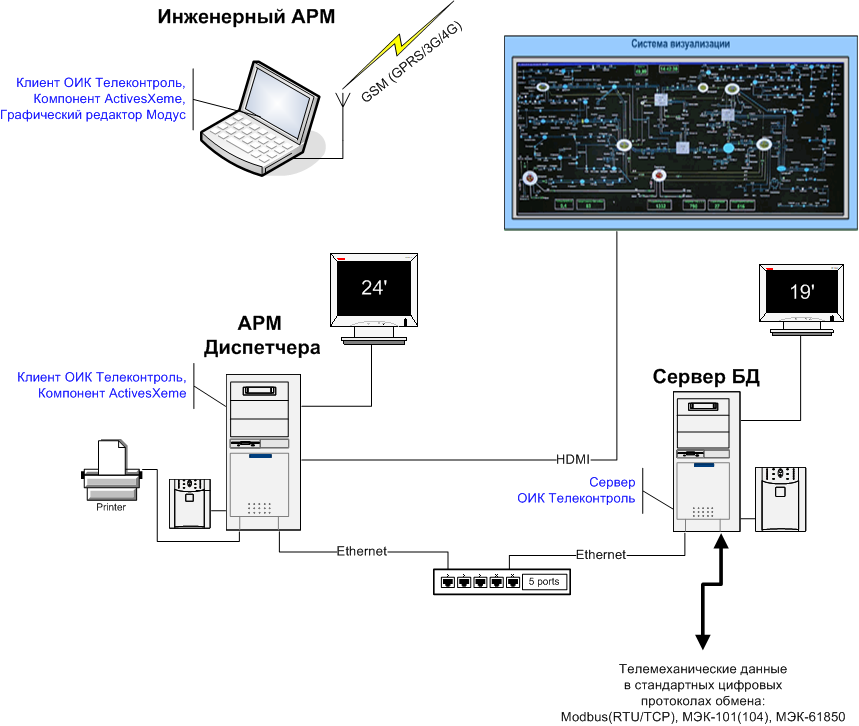
For operation, the system requires one computer for a single-machine deployment or multiple computers for a distributed deployment. The Server processes run on Windows 10 or newer or on Linux; the Client runs on Windows 10 or newer. The Client displays Modus diagrams itself; no additional component is needed for that. The Modus graphical editor is used to edit diagrams.
Installation is described in Getting started, and what changed between versions in the Change log.
All schematics are stored as vector graphics, so even large process diagrams remain compact and can be displayed at large scale on shared operator panels without loss of image quality.
The platform supports one or more operator workstations depending on the required user roles and access rights for the monitored automation system.
Example of a distributed deployment:
Key features
- Distributed multi-user Architecture with Windows and Linux server support
- Data display on Modus displays
- Interactive tables, graphs, and summaries with archive aggregation
- User tables with formulas and conditional formatting
- Telemetry acquisition and control over MODBUS, IEC 60870-5, and IEC 61850
- Retransmission of selected data to upper-level systems and an OPC UA server
- Formulas, manual input, and limit checks
- Object emulation for testing without field hardware
- Historical archives
(the
scada-historianprocess) with automatic removal of expired data; the limitations of version 2.6 are described under Archiving - Event journal with acknowledgement and importance-based highlighting
- Redundancy support for information objects
- Role-based access control through user administration
- Online engineering from any workstation, including configuration export and import
- Device watch and device metrics
- CSV export and printing of tables, summaries, the Data window and the event journal