Formulas
Any Telecontrol SCADA data item can use a mathematical expression as its data source. Formulas are used in data-item configuration (the Channel field, when no device is selected), in the Control condition, in tables and in user tables.
Object references
A formula refers to an object in one of three ways.
- Alias
- For example
u35_s1. The alias is set in the object's properties (see Data items). For a formula to reach it, an alias must start with a letter or_and contain only letters, digits and_. Write it exactly as it was set, including letter case. - Designation
- For example
TIT.646orTS.1379. This is the identifier the Server assigns to an object when it is created: a Latin namespace name (TITfor TIT objects,TSfor TS objects), a dot and a number. It is shown in the Browse Name field (Russian UI: «Обозначение») of the Attributes group in the object's Properties window. That field can be edited, but a formula refers to the identifier, not to the field's text, so go by the original value. The namespace name is Latin; its letter case does not matter. - Device channel
- For example
{IEC_DEV.1!115}— information object address 115 of IEC 60870 device number 1. Inside the braces goes the device identifier (IEC_DEV.1), a!and the channel address in the protocol's format. This is how an object's source is written when Device and Channel are selected in its properties, and a formula may use it like any other reference.
Braces take an identifier only, never an object name: {Heater temperature}
and {u35_s1} are not references. A Cyrillic ТИТ.1 is neither a
designation nor a channel reference — it is found only if an alias with that
exact text exists.
WARNING: in tables and user tables a device-channel reference works only
when it is the whole formula. Inside an expression (for example
{IEC_DEV.1!115} * 2) the Client in this version does not find it. Refer
there to the object that receives its value from that channel.
A leading =
- In a table a leading
=is allowed and dropped. - In a user table a leading
=is required: without it the cell content is plain text. - In an object’s Channel field and in the Control condition, do not write
=: a formula such as=TIT.1is rejected as invalid.
Operators
| Operator | Meaning | Precedence |
|---|---|---|
^ |
power | highest |
*, / |
multiplication, division | |
+, - |
addition, subtraction | |
=, <, >, <=, >= |
comparison: 1 if true, otherwise 0 | lowest |
-x |
negation | binds to the nearest operand |
!x |
logical NOT | binds to the nearest operand |
Operators of equal precedence are applied left to right. Parentheses group.
There is no “not equal” operator: != and <> are errors. Instead of
a != b write !(a = b) or not(a = b).
Unary - and ! apply to the nearest operand only: !a = b means
(!a) = b, and -x^2 means (-x)^2. Use parentheses when you mean
otherwise.
Logical values are true and false (1 and 0). Any non-zero value counts
as true.
Example: TIT.1 + TIT.2 — the sum of the TIT objects designated TIT.1
and TIT.2.
Functions
Function names, true and false may be written in any letter case:
sin, Sin and SIN are the same.
| Function | Description |
|---|---|
sin(x) |
sine |
cos(x) |
cosine |
tan(x) |
tangent |
asin(x) |
arcsine |
acos(x) |
arccosine |
atan(x) |
arctangent |
atan2(y, x) |
arctangent of y/x |
abs(x) |
absolute value |
not(x) |
logical NOT |
sqrt(x) |
square root |
sign(x) |
sign of a number: -1, 0 or 1 |
min(x1, x2, ...) |
minimum |
max(x1, x2, ...) |
maximum |
and(x1, x2, ...) |
logical AND |
or(x1, x2, ...) |
logical OR |
bitxor(x, y) |
exclusive OR: 1 if exactly one argument is true |
if(x, a, b) |
a if x is true, otherwise b |
Angles for trigonometric functions are specified in radians.
... means an arbitrary number of parameters.
If the value of any object in a formula is missing, the formula has no value either.
Examples
TIT.1 + TIT.2— the sum of two TIT objects by designation;u35_s1 * 1.05— the object with aliasu35_s1, increased by 5 %;{IEC_DEV.1!115} * 1000— channel 115 of deviceIEC_DEV.1, rescaled (in an object’s Channel field);if(or(rec1_current > 3, rec2_current > 3), rec3_current, 0)— aliasesrec1_current,rec2_current,rec3_current;and(!TS.1379, !TS.1380, !TS.1382)— true when all three TS objects are in state 0;!(TS.1 = TS.2)— true when the two TS objects differ.
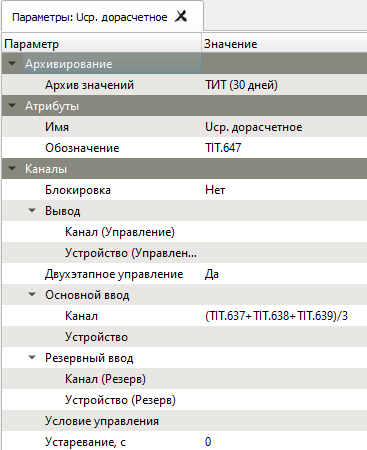
TIT.637, TIT.638 and TIT.639 are the designations the Server assigned
to these TIT objects when they were created.
Errors
If a formula in a table is invalid, the Client reports “Invalid
expression.” and does not keep the formula. If an object’s formula cannot
be parsed, or one of its references is not found, the object gets no value
and carries the quality flag K — not configured or a configuration error (see
Quality flags).