Configuration export and import
The server’s configuration can be exported to a file, edited or archived,
and imported back. Accounts holding the Configure right find the commands in the Client’s More
menu:
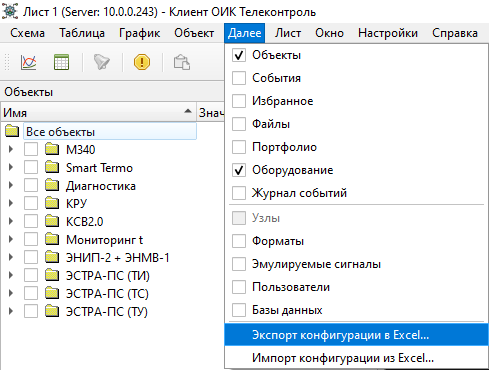
Export Configuration...saves the configuration to a file;Import Configuration...loads a file back into the server.
The file
The configuration is saved as a standard OPC UA
NodeSet: an XML
file in UTF-8 that any text or XML
editor can open. A large configuration is saved compressed (.xml.gz);
decompress such a file before editing it. Either form can be imported.
The file holds configuration only: current values, history and events are not part of it. User accounts and roles are left out by default and are never written by an import.
Import
Before anything is applied, the server checks the file and reports what would change: how many objects would be added, changed and deleted. The changes are applied only after you confirm, and they are applied as a whole: if any one of them cannot be made, the configuration is left as it was and the message lists what prevented it.
A file holding a whole configuration replaces it: objects the file does not list are deleted.
If the configuration changed after the file was exported, the server warns you: importing that file would overwrite the later changes. You can still check and apply it, but only explicitly.
Translation status
This English page is a direct translation of the current Russian page.