CLAUDE.md
This file provides guidance to Claude Code (claude.ai/code) when working with code in this repository.
Project Overview
This is the documentation site for Telecontrol SCADA (ОИК Телеконтроль), a Russian-language industrial control system. The site is built with Jekyll and hosted on GitHub Pages using the Just the Docs theme via jekyll-remote-theme.
All documentation content is written in Russian.
Local Development
bundle install           # Install dependencies
bundle exec jekyll serve # Serve locally (default: http://localhost:4000)
Site Structure
- Content pages: Markdown files at the root, in
client/, and indev/— each corresponds to a documentation page. - Navigation: Driven by per-page front matter (
title,nav_order,parent,has_children). Just the Docs builds the sidebar from this; there is no separate TOC data file. - Theme:
remote_theme: just-the-docs/just-the-docsin_config.yml. No custom layouts or includes — the theme provides them. - Images: Stored in
img/(root-level screenshots) andclient/(client-specific images).
Front Matter Conventions
Each page must have:
---
title: <Russian display title shown in nav and as <h1>>
nav_order: <integer ordering within its level>
permalink: /<url-path>           # optional but recommended
---
For pages with children, add has_children: true. Child pages reference their parent by title:
---
title: График
nav_order: 1
parent: Клиент
permalink: /client/graph
---
Key Conventions
- Internal links use Jekyll relative links (
jekyll-relative-linksplugin) — link to filenames without extensions (e.g.,[Архитектура](architecture)). - Mark page-level
<h1>with{:.no_toc}and use* TOC \n {:toc}if you want an in-page TOC; Just the Docs also exposes its own auto-generated TOC in the right rail. - Images are referenced with relative paths (e.g.,
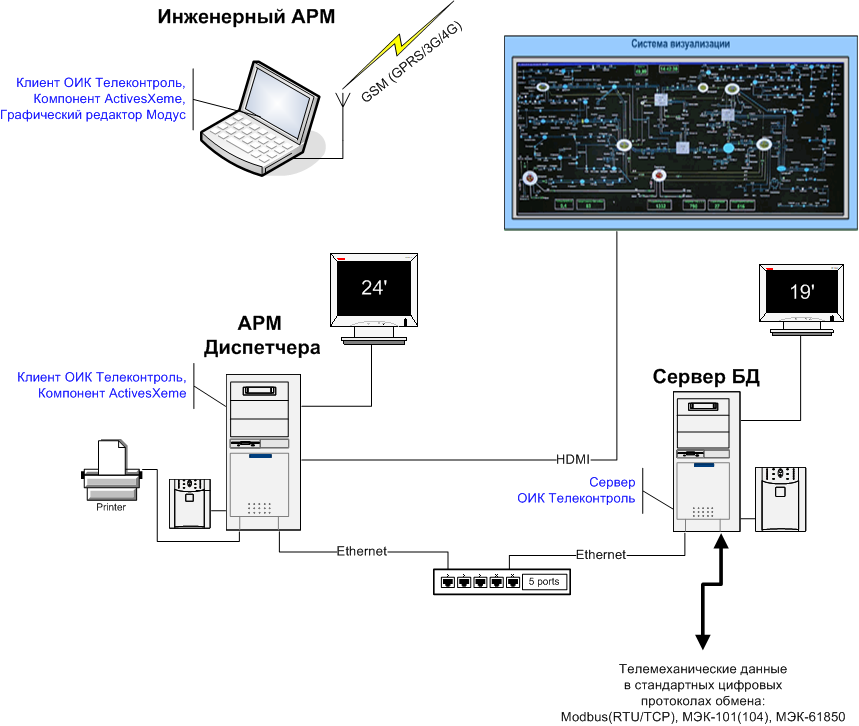). - When adding a new page, include the front matter above and pick a
nav_orderconsistent with neighbors. No central registry file to update.
Search
Client-side search via Lunr is enabled in _config.yml. The tokenizer is configured to split on whitespace and punctuation so Cyrillic queries work.
Screenshots under img/
Most images under img/ are produced by an offline screenshot generator that lives in the scada-client repo (client/app/screenshot_generator.cpp). Every file in img/ is tagged in ../client/docs/image_manifest.json with one of:
auto-view— main-window view; generator renders it via aWindowInforegistered with the controller registry.auto-dialog— modal dialog rendered by the generator’s dialog pipeline.auto-menu— right-click / popup menu rendered from the command registries.auto-state— device / node state capture (online, offline, …).manual-diagram— hand-drawn architecture or protocol diagram.manual-modus— Modus schematic; depends on the ActiveX runtime the offline fixture doesn’t have.manual-os— OS-level screenshot (e.g. Windows firewall).obsolete— no longer referenced from any page; removal candidate.
Regenerating auto images
From a scada-client checkout:
cmd.exe /c "cd /d C:\tc\scada && cmake --build --preset release-dev --target screenshot_generator"
cmd.exe /c C:\tc\scada\client\update_scada_docs_screenshots.cmd
For now the script updates only the current approved rollout subset: client-login.png, client-retransmission.png, graph-cursor.png, and users.png.
Then git diff img/ in scada-docs to review the changes before committing.
Adding a new image
- Decide whether the image can be auto-generated. If yes, add an entry to
../client/docs/image_manifest.jsonwith the rightauto-*tag, then extendclient/app/screenshot_data.jsonin scada-client (see the “Regenerating the doc screenshots” subsection ofclient/docs/design.mdfor the JSON schema). - If it has to be hand-captured (
manual-*), still add an entry there so future editors don’t assume it’s auto. - Reference it from the right markdown page with a relative path (
from root pages,fromclient/ordev/pages).